

What is a Mail Bomb?
A mail bomb is a deliberate attack where an email address is registered by a threat actor on thousands of websites across the internet. As a result, the inbox is inundated with confirmation emails, newsletters, account verification messages, and other unsolicited communications.
The motive behind this type of attack is to essentially act as a Denial of Service (DoS) for the mailbox or alternatively, a distraction for some other form of cyber attack being carried out.
Why Aren’t These Emails Automatically Blocked?
These emails often are more difficult to detect as they typically originate from legitimate senders who believe you’ve voluntarily subscribed to their services. Since they don’t exhibit typical spam characteristics, or contain phishing links / malicious attachments, they are less likely to be given a verdict.
These attacks typically subside within a few days and the above steps may only need to be applied temporarily.
How to Minimize the Impact
1. Zero Trust Policy
The Zero Trust toggle will quarantine emails by default. Clean and Infomail verdict will be reclassified as Spam-Likely, unless it has been sent from a known contact or allowed sender. This can be very useful to reduce the impact of a mailbomb attack as it will prevent emails from flooding the user’s mailbox. Creating Policies
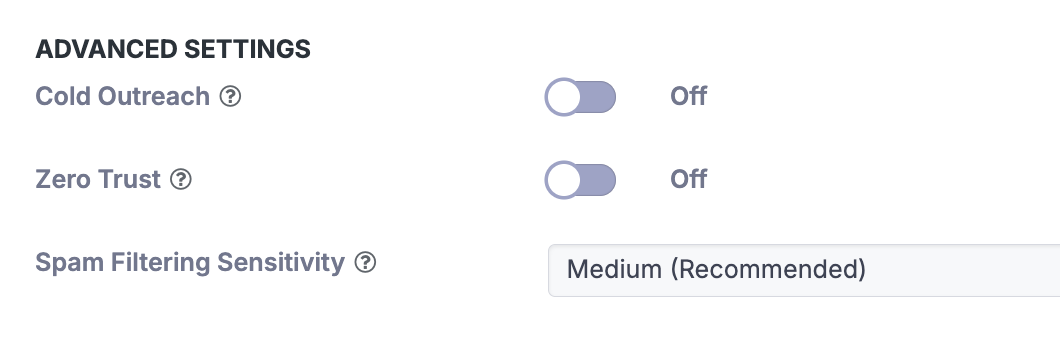
A “Known Contact” is a sender the recipient has previously sent outbound emails to.
Using Mesh Unified or Mesh 365, we identify these automatically. For the Mesh Gateway, using our Outbound Smarthost is required.
It is necessary to have our “Infomail” and “Spam-Likely” verdict to “Quarantine in Mesh” or “Junk in Outlook” to utilize this feature.
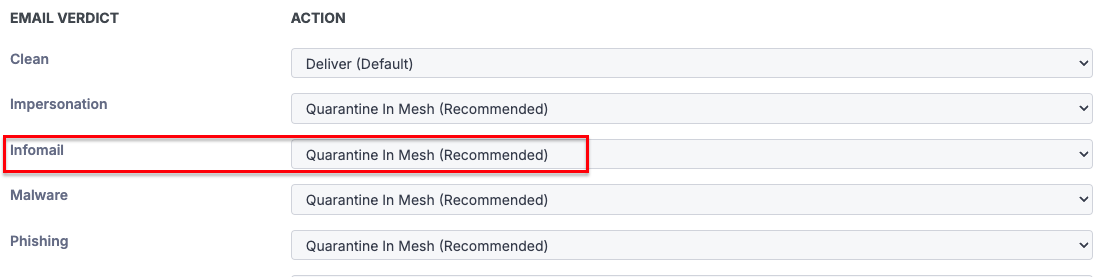
2. Quarantine Infomail Verdicts
A large amount of these emails will receive an “Infomail” verdict as they frequently contain unsubscribe links or other identifiable markers that our filter can detect. Ensure the policy option has set Infomail to “Quarantine in Mesh”.
3. Increase Spam Sensitivity
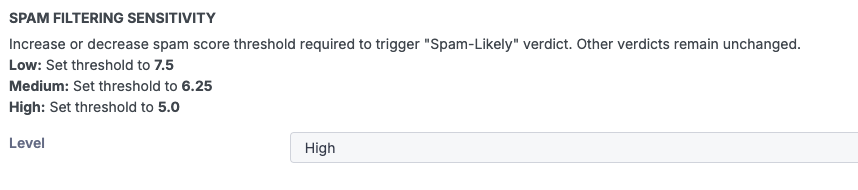
Set the Spam filter sensitivity to “High” within the policy. This reduces the threshold for emails to be classified as Spam-Likely, ensuring that more unwanted messages are quarantined before reaching the inbox.
4. Enable Geo-Filtering
While not always the case, we have seen scenarios where a large amount of the traffic originates from countries that don’t typically send legitimate traffic to that tenant/ email address. You can check where emails are originating from in the Live Email Tracker and populate the relevant countries in the Geo Filter section of the policy.

5. Contact Support
If the volume of unwanted emails persists, contact our support team for assistance. We can implement additional, customized filters to provide stronger protection and further reduce the attack's impact.
Related Articles