
Switch Service
This option allows partners to change the active service for an existing customer. It is possible to swap between Mesh Gateway, Mesh 365, and Mesh Unified within the UI, without needing to raise a ticket with our team.

Changing products can interrupt mailflow and may be subject to different pricing.

If a customer is currently on Mesh Gateway or Mesh 365 and wants to upgrade to Mesh Unified, please use the Mesh Unified upgrade option. More info here: Upgrade to Mesh Unified
Step 1: Navigate to the Customers page
Navigate to the “Customers” page within the partner hub.
Step 2: Select the Customer
Click the hamburger menu (⋮) beside the customer you want to modify.
Step 3: Select "Switch Service"
Select the “Switch Service” option.
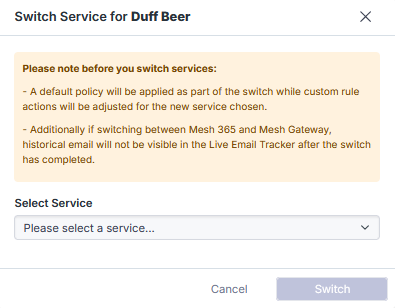
Step 4: Choose the Target Service
Select one of the available services:
Mesh Unified → Mesh Gateway and Mesh 365.
Mesh Gateway → Mesh 365.
Mesh 365 → Mesh Gateway.
If switching from Mesh Gateway or Mesh Unified to Mesh 365
MX records must be reconfigured to the customer’s own mail server e.g Microsoft 365.
They CANNOT point to Mesh MX records entry.
Failure to update MX records will result in email delivery failures. Please follow our installation guides: Installation guides
Step 5: Confirm the Change
Click “Switch” to apply the service change.